
Principal Disbursement
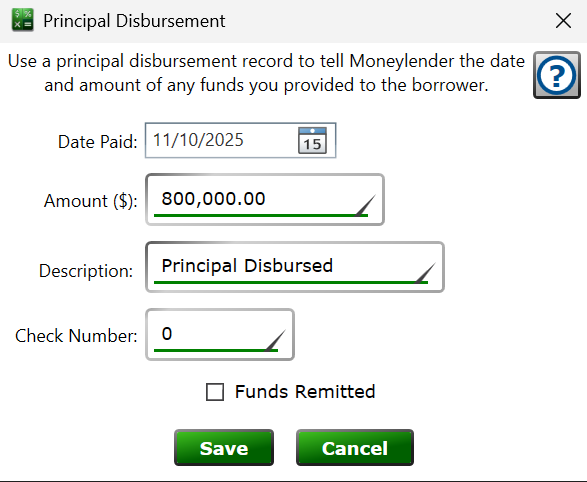
Get here by creating or editing a record in the Principal section of the Settings tab on the Loan Details panel.
Each principal record is money lent to the borrower—the original loan amount, an additional advance, or a draw on a line of credit. Adding a principal disbursement increases the loan's balance from the date entered, and the loan recalculates when you save.
Date Paid – the date the funds are disbursed; interest on this principal begins according to the loan's interest settings from this date.
Amount – the amount of principal being disbursed.
Description – any text you want to record alongside the disbursement, up to 200 characters.
Check Number – the check number to show when printing a check for this disbursement. With the disbursement selected in the Principal section, click the print button on that section's toolbar to print the check.
Funds Remitted – check the box once the money has actually been given to the borrower. Disbursements that are not yet remitted are the ones offered when building an ACH principal disbursement file, and they are marked remitted automatically when included in a file.
See also: Add Principal and Extend Loan, ACH Principal Disbursement File