
Interest
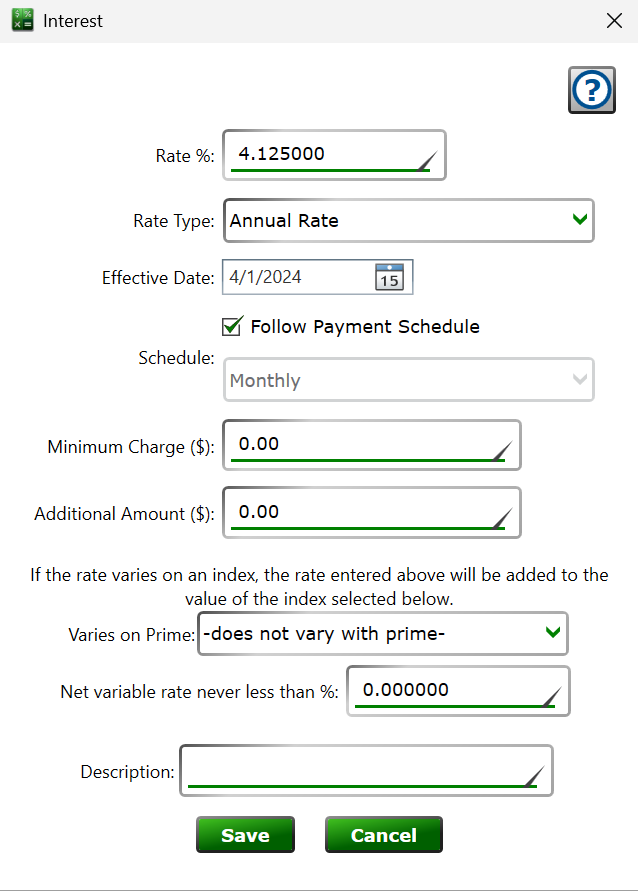
Get here by creating or editing a record in the Interest Rates section of the Settings tab on the Loan Details panel.
Each interest setting tells the loan what rate to charge starting on a specific date. A loan can have any number of interest settings—a fixed-rate loan just has one, and a loan whose rate changes over time has one setting per change.
Rate % – the interest rate. If the setting varies on an index (below), this rate is added on top of the index's value.
Rate Type – how the number above is applied: Annual Rate adjusts the interest by the amount of time that has gone by, the way mortgages and car loans work; Percent of Initial Principal adds the same percentage of the opening loan amount every cycle; Percent of Outstanding Principal charges the percentage against the current balance each cycle; Fixed Currency Amount adds the entered amount every cycle regardless of the balance.
Effective Date – the date this setting takes over from the previous interest setting on the loan.
Follow Payment Schedule – leave the box checked and interest is charged on the loan's payment schedule. Uncheck it to pick a separate Schedule for the interest, for example quarterly interest with monthly payments.
Minimum Charge – the least amount of interest to add each cycle, even when the calculated interest comes out lower. (When the balance is zero, no interest is charged even with a minimum set.)
Additional Amount – a fixed amount added on top of the calculated interest each cycle.
Varies on Prime – to make the rate variable, pick one of your variable rate indexes. The loan's rate becomes the index's value on each date plus the Rate % entered above, and the loan recalculates whenever the index's rate history changes.
Net variable rate never less than % – a floor for the combined variable rate, so a falling index can't take the loan below this rate.
Description – any text you want to record alongside the setting, up to 50 characters.
See also: Loan Settings, Variable Rate Indexes