
Bulk Loan Edit
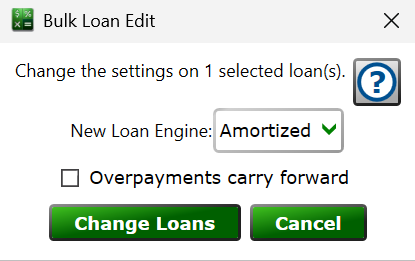
Find this window from the main menu – Tools > Bulk Change Loan Engine. Select the loans to change in the main window first.
This tool switches every selected loan to a different loan calculation engine in one step, instead of opening each loan's Loan Settings individually. It's most useful after an import, when many loans arrived on one engine but belong on another.
New Loan Engine – choose the engine that all of the selected loans will use. The Loan Engines guide describes what each engine does and when to use it.
Overpayments carry forward – the checkbox sets the same-named option on every selected loan along with the engine: checked, extra money paid lessens the amount due on following due dates; unchecked, Moneylender manages whether a surplus applies to upcoming due dates.
Click and, after a confirmation, the engine and the carry-forward option are written onto each selected loan and every one of them is recalculated immediately.
See also: Loan Engines, Loan Settings